



FlightScope Mevo Gen2 Launch Monitor / Golf Simulator (Canada Only)
Regular price
$1,883.55 CAD
INCLUDES Free Shipping!
*where applicable; shown at checkout
*where applicable; shown at checkout
- Estimated Lead Time: 1 to 3 Business Days*
- Ships From: Canada** */** Mouseover or click here for full details
*Lead time is the period from when we receive payment (and after layout approval if order has applicable items) to the date the product is estimated to ship out. Par2Pro will make every effort to ensure you receive your order as fast and cost efficient as possible.
**International shipments may be subject to customs brokerage, local import duties, and other charges, which are the sole responsibility of the addressee, as are any taxes levied by government authorities in the destination country.
Why Buy From Par2Pro?
✓ Satisfaction Guarantee
✓ Price Match Guarantee
✓ No Additional Tariffs (if shipping within the same country)
✓ Best Service & Support from In-House Specialists
✓ Par2Pro Tested and Approved
Click here for full details

Mevo Gen2
The Mevo Gen2 delivers tour-level accuracy in tight indoor spaces and on the range.
The new FlightScope Mevo Gen2 is engineered to transform your golf game, offering precision insights and endless entertainment. Powered by FlightScope's Patented Fusion Tracking Technology, it delivers accurate performance data you can trust, indoors or out.
MyGolfSpy Staff Pick: Best Personal Launch Monitor of 2025 Recognized for its accuracy, ease of use, and breakthrough price point
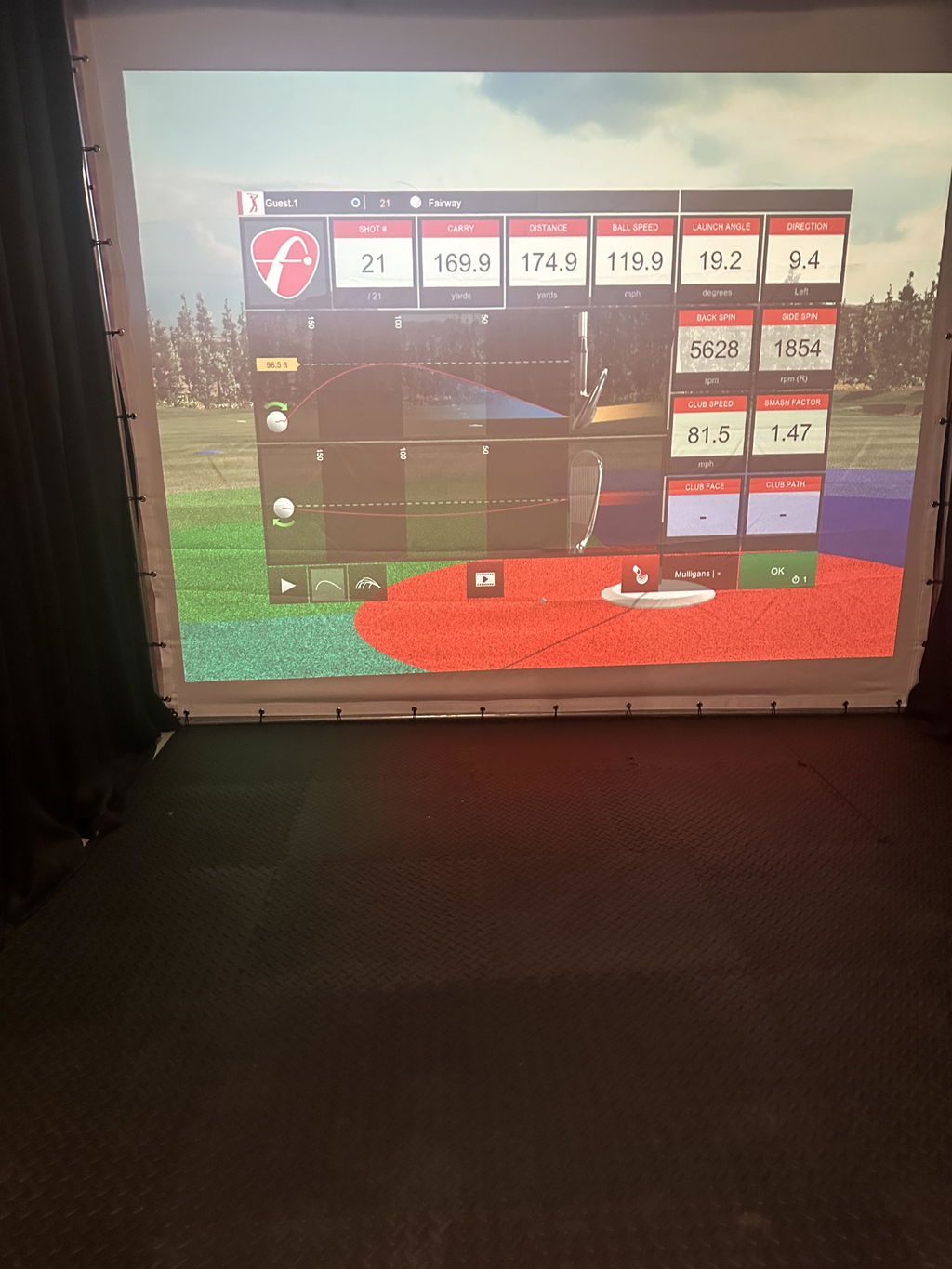
- Reliable Data: Captures actual club and ball metrics across 20 parameters, with no calculated estimates. Patented FlightScope Fusion Tracking combines Doppler radar and high-speed optics.
- No Subscription Traps: Full feature access and 8 home golf simulator courses by E6 Connect out of the box, with $0 recurring fees.
- Longer Battery Life: 6 hour battery life with fast USB-C charging.
- Optional Upgrades: Add the Pro Package (11 advanced club data parameters) and Face Impact Location.
- Indoors or Out: Accurate in tight indoor spaces, at the range, or in your backyard.
WHAT'S INCLUDED? ▼
In The Box:
- Mevo Gen2 unit
- Power supply
- USB-C cable
- Carry case
- Quickstart guide
- 100 aluminum stickers
Free Software:
- FS Golf Practice App for iOS, Android, and PC
- FS Skills Challenges App for iOS and Android
- E6 Connect 8 Course Bundle for iOS and PC:
- Kiawah Ocean Course: SC, USA
- Torrey Pines South Course: CA, USA
- Kapalua Golf Club Plantation Course: HI, USA
- Valderrama Golf Club: Cádiz, Spain
- Sea Island Seaside Course: GA, USA
- Pelican Hill Golf Club: CA, USA
- Chateau Whistler Golf Club: BC, Canada
- Latrobe Country Club: PA, USA
SPECIFICATIONS ▼
Dimensions: 6.9 x 1.2 x 5.6 inches
Weight: 1.1 lbs
Batteries: Rechargeable Li-ion battery included. Battery life up to 6 hours
FS Golf App Requirements:
iOS
Minimum:
System: iOS 17 or newer
iPad: 8th gen+ / mini 6th gen+ / air 5th gen+ / pro 4th gen+
iPhone: XR / XS / 11+
Recommended:
System: iOS 18
iPad: iPad Pro 6th or 7th gen
iPhone: 15 Pro / 16 Pro+
Android
Minimum:
System: Android 12 or newer
Processor: Snapdragon 865 / Exynos 990 or equivalent
RAM: 8 GB
Recommended:
System: Android 12 or newer
Processor: Snapdragon 8 Gen 1 / Exynos 2200 or equivalent
RAM: 12 GB or more
Windows
Minimum:
OS: Win 10 or 11 (64 bit)
CPU: Intel Core i3-13100 / Ryzen 5 5560 (or higher)
RAM: 8GB DDR4 (or higher)
Hard-drive: 128GB (at least 10GB of free memory)
Recommended:
OS: Win 10 or 11 (64 bit)
CPU: Intel Core i5-10210 / Ryzen 5 5600 (or higher)
RAM: 16GB DDR4 (or higher)
GPU: Intel UHD Graphics / Radeon Graphics or better, compatible with DirectX 11
Hard-drive: 256GB (at least 10GB of free memory, SSD drive recommended)
E6 Connect PC Requirements:
Intel i5 Processor
8GB RAM
Nvidia 1070 Graphics Card or equivalent (Dedicated GPU with DirectX 11 Support)
25GB of Hard Drive Space
Windows 10 (Required)
Internet Connection (Required)
SETUP REQUIREMENTS ▼
Outdoor Full Swing: 7-9 feet sensor to tee distance with unrestricted ball flight.
Limited Flight: 7-9 feet sensor to tee distance with 8 feet of ball flight minimum. Aluminum stickers or Titleist RCT balls required for accurate spin measurements.
Putting: 5 feet sensor to tee and a minimum recommended 8 feet of flat roll distance.
Limited Flight Chipping: 7-9 feet sensor to tee and 8 feet minimum ball flight. Aluminum stickers or Titleist RCT balls required for accurate spin measurements.
Full Flight Chipping: 7-9 feet sensor to tee and 50 yard maximum ball flight.
Mevo Gen2 is designed to operate in most environments. However, certain appliances and equipment can create noise that can interfere with reading shots. Some common noisy objects are:
- air conditioners / HVAC systems
- fluorescent lights
- fans
- fridges
- TVs, laptops & desktop computers in front of the Mevo
- signal towers
WARRANTY ▼
The Mevo Gen2 is covered by FlightScope's 12-month manufacturer warranty.
RETURNS ▼
We accept returns up to 30 days after delivery. Please consult our returns policy and FlightScope's sales terms and conditions including their refund policy. Please note that card processing fees, shipping costs, and any other non-recoverable costs for your order are non-refundable.
USER MANUAL ▼
FlightScope Mevo Gen2 User Manual
*manual may change without notice
FIRMWARE AND APPS ▼
FlightScope works hard to put out continuous updates to provide the best experience with their hardware and software. It is important to check for these updates in your application often to get the most out of your FlightScope Mevo Gen2.
Go to the Firmware & Apps page.
If you need additional assistance, FlightScope's Customer Care team is available.

LIGHTWEIGHT & PORTABLE
Take your game anywhere.


Unrivaled Accuracy, Unbeatable Value
At FlightScope, we know that precise and consistent performance data is the foundation of true improvement. That's why the Mevo Gen2 is powered by FlightScope's Patented Fusion Tracking Technology, delivering the most accurate data you can get, whether you're practicing indoors or out. Fusion Tracking isn't just advanced; it's a game-changer, seamlessly combining the strengths of 3D Doppler Radar with synchronized image processing to give you accurate and consistent data so you can focus on your game.
Performance Data You Can Trust
Full Swing
- Carry Distance
- Roll Distance
- Total Distance
- Ball Speed
- Club Speed
- Smash Factor
- Vertical Launch Angle
- Horizontal Launch Angle
- Spin Rate
- Spin Axis
- Apex Height
- Flight Time
- Lateral Landing
- Angle of Attack
- Spin Loft
- Shot Dispersion
- Shot Type
Chipping
- Carry Distance
- Roll Distance
- Total Distance
- Ball Speed
- Club Speed
- Smash Factor
- Vertical Launch Angle
- Horizontal Launch Angle
- Spin Rate
- Spin Axis
- Apex Height
- Flight Time
- Lateral Landing
- Angle of Attack
- Spin Loft
- Shot Dispersion
Putting
- Launch Speed
- Total Distance
- Ball Direction
Optional upgrades: The Pro Package unlocks 11 advanced data parameters, including club path, face angle, vertical/horizontal swing plane, and low point. Face Impact Location tracks the precise point of ball-to-clubface contact.

Play Iconic Golf Courses Anywhere
Tee off on some of the world's most iconic golf courses without leaving your home.With your Mevo Gen2, you gain lifetime ownership of an exclusive E6 Connect simulation bundle, unlocking 8 famous golf courses for endless entertainment. Challenge family and friends, work on your game, and experience the thrill of real golf courses, all from your home. Included courses for iOS and PC, straight out of the box:
- Kiawah Ocean Course: SC, USA
- Torrey Pines South Course: CA, USA
- Kapalua Golf Club Plantation Course: HI, USA
- Valderrama Golf Club: Cádiz, Spain
- Sea Island Seaside Course: GA, USA
- Pelican Hill Golf Club: CA, USA
- Chateau Whistler Golf Club: BC, Canada
- Latrobe Country Club: PA, USA

Customizable Software To Fit Your Unique Needs
Experience an advanced golf practice with the redesigned FS Golf Software, crafted to enhance your game.Our comprehensive iOS, Android, and PC app puts powerful data, video analysis, performance data averages, and stunning 3D trajectories right at your fingertips. Take control of your progress by setting custom data margins for instant, actionable feedback on every shot. Plus, with automatic video recording and performance data overlay, you'll gain unparalleled insight into your mechanics, making every session smarter and more effective.
Integrated Video: Your Ultimate Analysis Tool
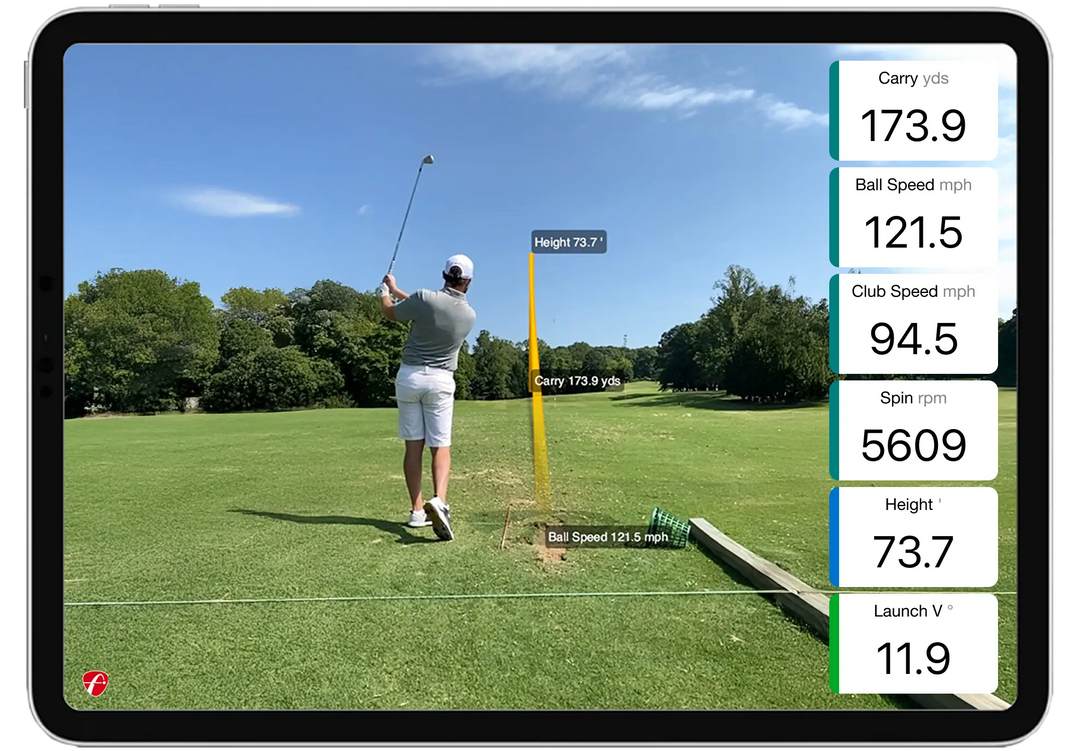
FlightScope Shot Tracer:
The "As Seen on TV" FlightScope Tracer feature now has single-device compatibility, allowing users to capture and view accurate 3D trajectories with performance data overlays and a shot tracer with the swing video. This gives teaching, club fitting, and practice sessions (plus social media content creators and influencers) a professional, live TV broadcast look, with the added benefit of easily and dynamically sharing these videos.

Action Video Clips with Data Overlay:
The FS Golf software automatically records, clips, and saves every video and overlays performance data, giving users the complete picture for every shot. Users also have the ability to draw lines and circles as well as record a voiceover with comments.

Share Your Videos:
Easily share your videos, featuring insightful data overlays, with family, friends, and your coach, or post them directly to your social media channels. Showcase your improvements and get valuable feedback from your network.

Practice with Purpose
Unlock your best golf with Mevo Gen2's Skills Combines and Challenges.This powerful feature goes beyond standard range sessions, offering the most advanced and customizable assessments to pinpoint your strengths and identify areas for improvement. Practice with a purpose by creating Customized Challenges tailored to your unique needs, or test your abilities against the best with FS PGA and LPGA Challenges and thrilling competitions like the Long Drive and Range Competition. With Mevo Gen2, every practice session is an opportunity to refine your skills, compare your progress, and practice smarter to achieve your ultimate golfing goals.

Build Explosive Swing Speed and Drive it Further
Unleash your true power with Mevo Gen2's dedicated Swing Training mode. Work on your swing mechanics and build explosive club head speed without hitting a ball, so you can drive further and gain crucial yards where it matters most: on the course. Get ready to transform your game with newfound distance and confidence. PLUS you can choose between your own club, The Stack System, or SuperSpeed weighted clubs to train your way.Frequently Asked Questions
What data parameters does the Mevo Gen2 provide? +
Full Swing: Carry Distance, Roll Distance, Total Distance, Ball Speed, Club Speed, Smash Factor, Vertical Launch Angle, Horizontal Launch Angle, Spin Rate, Spin Axis, Apex Height, Flight Time, Lateral Landing, Angle of Attack, Spin Loft, Shot Type and Shot Dispersion
Chipping: Carry Distance, Roll Distance, Total Distance, Ball Speed, Club Speed, Smash Factor, Vertical Launch Angle, Horizontal Launch Angle, Spin Rate, Spin Axis, Apex Height, Flight Time, Lateral Landing, Angle of Attack, Spin Loft and Shot Dispersion
Putting: Launch Speed, Total Distance, and Ball Direction
The Mevo Gen2 supports optional software upgrades to expand your swing analysis:
Pro Package: Unlocks 11 advanced data parameters, including club path, face angle, vertical/horizontal swing plane, and low point.
Face Impact Location: Tracks the precise point of ball-to-clubface contact.
Can I play Simulation Golf using the Mevo Gen2? +
The Mevo Gen2 integrates with leading golf simulation software, including E6 Connect (TruGolf), Awesome Golf (PC & iOS), and GSPro (PC). Your Mevo Gen2 purchase includes ownership of 8 golf courses (iOS and PC) powered by E6 Connect.
Is there a yearly fee? +
All core data parameters, firmware updates, and software fixes for the FlightScope Mevo Gen2 are completely free with no subscription required.
Does the Mevo Gen2 have a built in camera? Can I video my swing using the Mevo Gen2? +
Yes, the Mevo Gen2 features a built-in camera. Using the FS Golf app, you can automatically record, clip, and sync swing videos with optional data overlays using either the radar's camera or your mobile device. For multiple angles, use the FS Multicam app (iOS/Android).
How do I connect the Mevo Gen2? +
The Mevo Gen2 generates its own Wi-Fi network and requires no internet connection, allowing you to use it anywhere.
What is included with a Mevo Gen2 purchase? +
The Mevo Gen2 includes a carry case, power supply, USB-C charging cable, Quickstart Guide, and 100 aluminum stickers.
Can Mevo Gen2 be used indoors and outdoors and how much space is required? +
Yes, Mevo Gen2 can be used indoors and outdoors.
Space Requirements:
Outdoor Full Swing: 7-9 feet sensor to tee distance with unrestricted ball flight.
Limited Flight: 7-9 feet sensor to tee distance with 8 feet of ball flight minimum. Aluminum stickers or Titleist RCT balls required for accurate spin measurements.
Putting: 5 feet sensor to tee and a minimum recommended 8 feet of flat roll distance.
Limited Flight Chipping: 7-9 feet sensor to tee and 8 feet minimum ball flight. Aluminum stickers or Titleist RCT balls required for accurate spin measurements.
Full Flight Chipping: 7-9 feet sensor to tee and 50 yard maximum ball flight.
Where should Mevo Gen2 be placed for best results? +
For accurate readings, place your Mevo Gen2 unit 8 feet directly behind the golf ball and in-line with the radar's camera on the ground.
Does Mevo Gen2 simulate ball flight? +
Yes, you can view simulated ball flight from several angles, including down-the-line, 45-degree, side, and top views.
What is the size of a Mevo Gen2? +
Dimensions: 6.9 x 1.2 x 5.6 inches
Weight: 17.6 ounces
Does Mevo Gen2 have its own power source? +
Yes, battery life is up to 6 hours on a full charge.
Can Mevo Gen2 be used for swing training? +
Yes, the Mevo Gen2 can be used for swing training, allowing you to focus on improving your club speed without hitting a golf ball. For this session type, you can use your own golf clubs, The Stack System, or SuperSpeed weighted clubs.
Are there skills challenges for Mevo Gen2? +
The FS Golf app for Mevo Gen2 includes engaging Skills challenges to make practice more purposeful. Test your abilities with:
PGA & LPGA Challenges: Compare your stats against professional tour averages.
Long Drive Competition: Focus on maximizing speed and distance.
Range Competition: Hone your distance control with targeted practice.
Are there any conditions that may affect performance of Mevo Gen2? +
Yes, avoid fluorescent lights, heavy machinery, large amounts of metal, and rotating objects (fans, A/C) near your Mevo Gen2, as they can affect performance.
Battery Storage +
If you are planning on storing your FlightScope unit for an extended period of time, please note that rechargeable batteries can slowly deplete over time when left unused. To better preserve the battery in your launch monitor over any extended period of non use, it is very important to take the following steps:
- Clean and dry the unit.
- Ensure that the battery is fully charged before putting it away for extended periods of time.
- Store the unit indoors, in its case, pouch, box, or backpack.
- Store in moderate temperatures, ideally between 60°-70° F. Avoid hot and cold conditions.
- When stored for an extended period of time, the battery should be recharged every 2-3 months to ensure it does not become completely drained.
- When the time comes that you wish to use the radar again, please give it another full charge.
What is the difference between Mevo Gen2 and Mevo+? +
While both are highly rated, the Mevo Gen2 is a newer model with upgraded tracking technology compared to the Mevo+.
Included E6 Connect Courses:
Mevo Gen2 includes an 8-course package: Kapalua - Plantation, Kiawah Island - The Ocean Course, Torrey Pines - South Course, Latrobe Country Club, Pelican Hill Golf Course, Chateau Whistler Golf Club, Sea Island Seaside Course, and Valderrama Golf Club.
Mevo+ includes a 12-premium course package: Pebble Beach, Old Course - St Andrews, Bethpage Black, Bay Hill, Harbour Town, The Belfry, Banff Springs, Panther Lake, Wade Hampton, Oslo Golf Club, The Greenbrier, and Aviara.
Note: Additional courses can be purchased separately. Both units fully support software add-ons like the Pro Package and Face Impact Location.
Battery Life and Charging: The Mevo Gen2 has a longer battery life (up to 6 hours vs. the Mevo+'s 3 hours) and uses a modern USB-C charging port.
Design: The Mevo Gen2 has a newer, taller, and more compact vertical design, which some users may prefer.
What is the difference between Mevo Gen2 and Mevo? +
Data Parameters: Mevo Gen2 provides 20 ball and club data parameters, while Mevo offers 8.
Technology: Mevo Gen2 uses Fusion Tracking (Radar + Image Processing) while Mevo uses 3D Doppler Radar.
Simulation Capabilities:
Mevo Gen2: Includes an 8-course E6 Connect bundle (Kapalua - Plantation, Kiawah Island - The Ocean Course, Torrey Pines - South Course, Latrobe Country Club, Pelican Hill Golf Course, Chateau Whistler Golf Club, Sea Island Seaside Course, and Valderrama Golf Club).
Mevo: Does not support simulation courses.
Can I purchase the 12 Course E6 lifetime license for my Mevo Gen2? +
Yes, there is a one time payment of $250 USD to add Pebble Beach, Old Course - St Andrews, Bethpage Black, Bay Hill, Harbour Town, The Belfry, Banff Springs, Panther Lake, Wade Hampton, Oslo Golf Club, The Greenbrier, and Aviara.
How accurate is the Mevo Gen2 compared to $20,000 units? +
The Mevo Gen2 uses patented Fusion Tracking (radar + camera) for unmatched indoor and outdoor accuracy. Independent testing by industry experts (including Carl's Place and GolfBusters) confirms its accuracy is within 1% of the Foresight GCQuad and Trackman 4, at a fraction of the cost.