


FlightScope Mevo+ / Mevo Gen2 Pro Package & Face Impact Location
Regular price
$975.00 USD
Regular price
Sale
$1,499.00 USD
Sale price
$975.00 USD
INCLUDES Free Digital Delivery!
*where applicable; shown at checkout
*where applicable; shown at checkout
- Estimated Lead Time: 1 to 3 Business Days*
- Ships From: Email Link** */** Mouseover or click here for full details
*Lead time is the period from when we receive payment (and after layout approval if order has applicable items) to the date the product is estimated to ship out. Par2Pro will make every effort to ensure you receive your order as fast and cost efficient as possible.
**International shipments may be subject to customs brokerage, local import duties, and other charges, which are the sole responsibility of the addressee, as are any taxes levied by government authorities in the destination country.
Why Buy From Par2Pro?
✓ Satisfaction Guarantee
✓ Price Match Guarantee
✓ No Additional Tariffs (if shipping within the same country)
✓ Best Service & Support from In-House Specialists
✓ Par2Pro Tested and Approved
Click here for full details
Pro Package and Face Impact Location Software Add-ons for Your Mevo+ or Mevo Gen2
Elevate your Mevo+ or Mevo Gen2 experience with the Pro Package and Face Impact Location add-ons. Investing in the Pro Package and Face Impact Location add-ons transforms the Mevo+ and Mevo Gen2 into a powerful training tool that provides a competitive edge. If you are looking to improve your game, enhance your lessons, or add to the club fitting experience, these add-ons are for you!
You must have a Mevo Gen2 or Mevo+ to use Pro Package and Face Impact Location
- Includes essential data like club path, face angle, swing planes, and more
- Face Impact Location adds 2 additional data parameters and face mapping
- Shot grouping and heat mapping visualizations for every shot
- Includes both the Trajectory Optimizer and the Environmental Optimizer
- Works indoors and outdoors
- One-time purchase, no subscription required


Understand your swing
Data parameters like club path, face angle, and face impact location help you identify swing tendencies and areas that need improvement like never before. Hitting a big slice? Check your data and make adjustments.

Improve consistency
Face Impact Location gives you the data and visualizations you need to work on consistently making contact with the center of the face. All of your shots are saved so you can track your progress over time.

Added Data Parameters
Pro Package and Face Impact Location add-ons include 13 additional data parameters to help you understand your swing and ball flight like never before.
Available Data Parameters
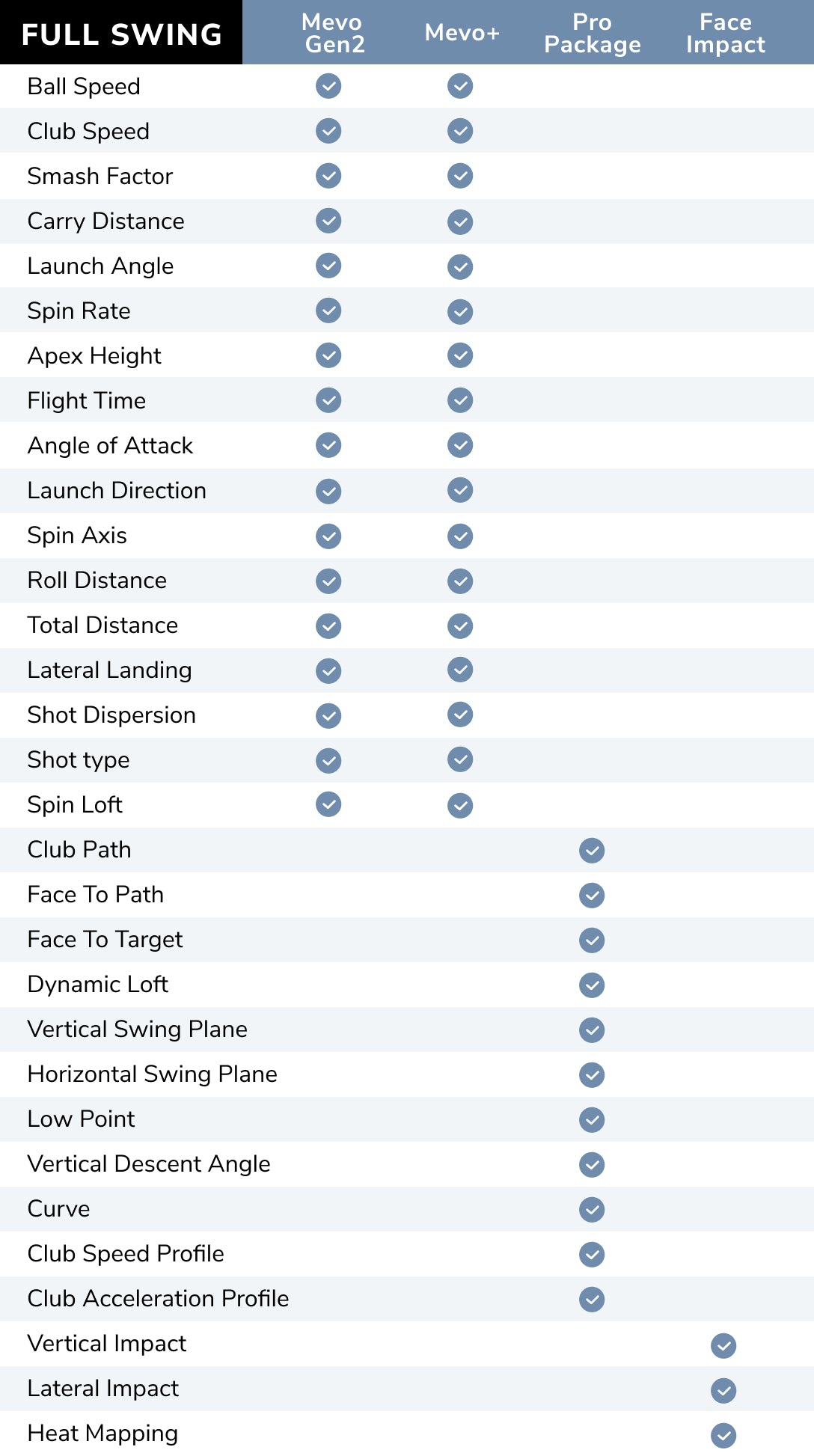

Pro Package (11 parameters)
- Club Path
- Face to Path
- Face to Target
- Dynamic Loft
- Vertical Swing Plane
- Horizontal Swing Plane
- Low Point
- Vertical Descent Angle
- Curve
- Club Speed Profile
- Club Acceleration Profile
Face Impact Location (2 parameters)
- Lateral Impact
- Vertical Impact
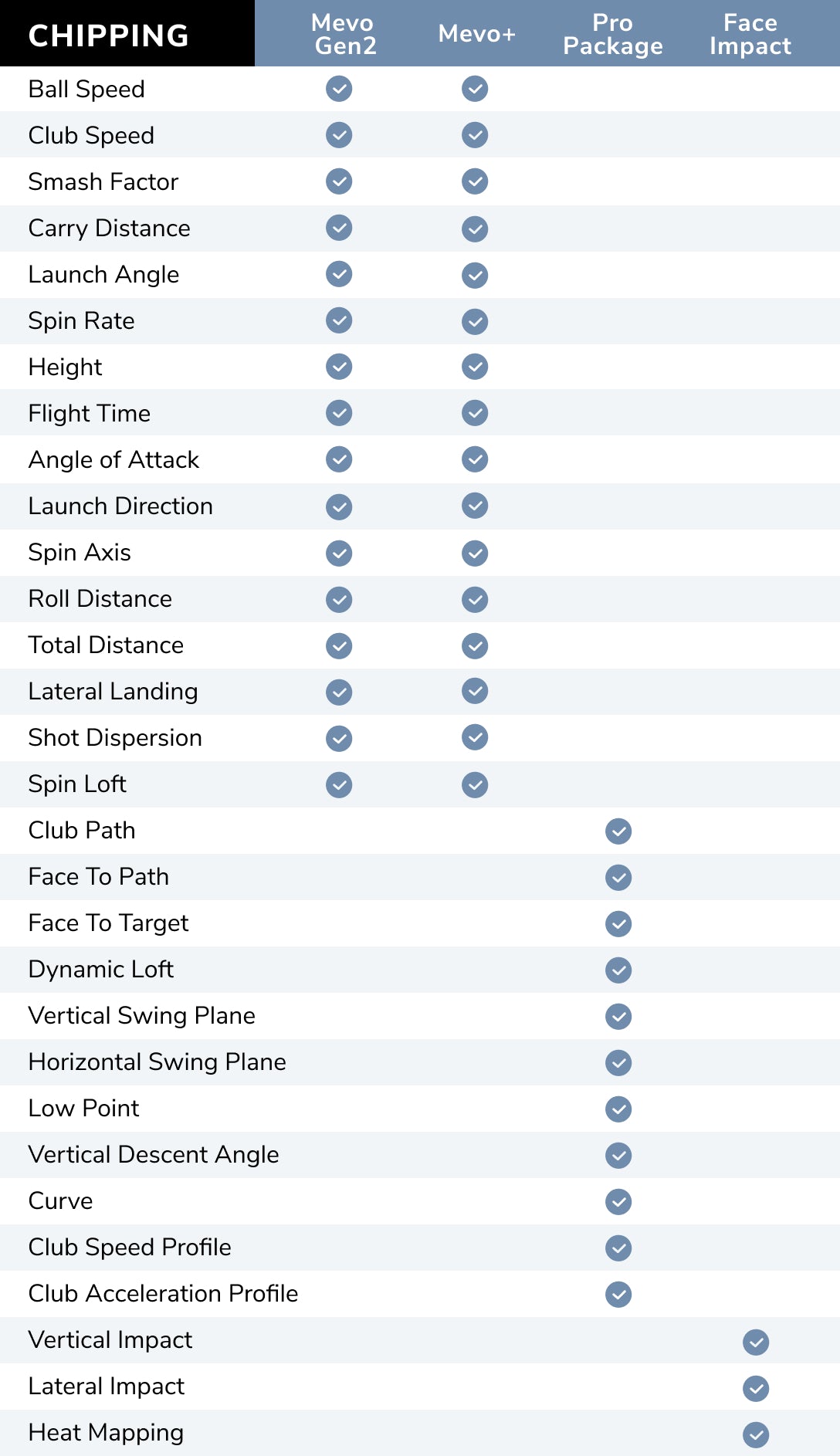
Pro Package parameters are available for both full swing and chipping sessions.
Additional Benefits
Exclusive features and benefits included for Pro Package and Face Impact Location users

Face Impact Location
View the precise location of impact for every club and compare it to the data for that shot. Face Impact Location also adds two additional data parameters: lateral impact and vertical impact.
Select Face Impact Location as a data parameter on the Trajectory screen in the FS Golf App, or select it as the only screen you see. You can also utilize the entire D-Plane dataset with Face Impact Location to analyze every aspect of your swing and discover areas of improvement.

Heat Mapping Visualization
(Tablets only)
Heat mapping visualization provides a visual distribution of impact location for a specific club over the entire session. The heat map is designed to give users a face impact overview for an entire session.
Review your entire session and see exactly where on the club face you strike most. Heat Mapping Visualization works for every club in a given session. The Heat Mapping is only available on the tablet version of the FS Golf app and is not available on the phone version of the FS Golf app.

Trajectory Optimizer
(Only available for iOS at this time)
Trajectory Optimizer allows you to optimize every club in your bag based on personalized shot data and environmental factors like weather.
Shot and Surface Types
Choose from different shot trajectory types such as high, mid, or low. You can also choose different surface types like soft, medium, and hard to optimize for your specific game.
User Interface
The user interface boasts an intuitive design, and this tool proves valuable for teachers, club fitters, and golfers of all skill levels, allowing them to focus on key parameters for achieving desired trajectories with each club.

Environmental Optimizer
Change your environment without changing your location.
Plan and prepare for all weather conditions and landscapes by modifying your environment to understand how climate variables affect your shot.
FlightScope Environmental Optimizer allows you to configure the impact of:
- Actual Altitude
- Air Temperature
- Relative Landing Height
- Humidity
- Wind Speed/Direction
- Density Altitude

FS Golf PC 2.0 Software Included
Practice with purpose with the new FS Golf PC 2.0 Software, now included with your Pro Package purchase ($99 value).
Lighting Requirements for Face Impact Location
The FlightScope Mevo Gen2 and Mevo+ use Advanced Fusion to record the Face Impact Location on your shots. FlightScope's Patented Advanced Fusion Tracking feature requires sufficient lighting to collect accurate data.
The minimum light measurement in your hitting area to achieve this is 300 lux. Because this is the minimum requirement, we recommend lighting the area so that you achieve a lux reading higher than 300 with a lux meter in an area with a 3 foot (approximately 0.9 meter) radius measured from the hitting location.
License and Activation
- One-time purchase linked to your Mevo Gen2 or Mevo+ for the lifetime of the unit. No subscription required.
- An activation code is delivered by email and applied to your device through the FS Golf app. One code activates both Pro Package and Face Impact Location.
- Can be added at any time after purchasing your Mevo Gen2 or Mevo+.
- Not compatible with the original Mevo. Mevo Gen2 or Mevo+ not included.
- Software purchases are non-refundable.
Frequently Asked Questions
Is the Pro Package with Face Impact a one time fee or a subscription?+
The Pro Package with Face Impact is a one-time purchase linked to your unit for life. Once purchased, you will receive an activation code via email, which you can apply to your Mevo Gen2 or Mevo+ through the FS Golf app. The one code provided will activate both Pro Package and Face Impact Location on your device.
Do I get additional golf courses with the Pro Package?+
The Pro Package does not include additional golf courses, but its data parameters will become available across your simulation software. Please note, however, that the specific data displayed is ultimately controlled by what that software's interface supports.
Can I purchase the Mevo Gen2 or Mevo+ and add the Pro Package later?+
Yes. You can add the Pro Package at any time, and it remains linked to your Mevo Gen2 or Mevo+ for the lifetime of the unit.
What is included in my purchase?+
Pro Package:
- 11 Advanced Data Parameters: Unlocks face to path, face to target, dynamic loft, club path, vertical/horizontal swing plane, low point, vertical descent angle, curve, club speed profile, and club acceleration profile.
- FS Golf PC 2.0: Access to the PC software version of the app.
- Trajectory Optimizer: Available on iOS only.
- Environmental Optimizer: Tools to adjust for weather and climate variables.
Face Impact Location: An add-on feature that shows the precise spot where the ball makes contact with the club face for every shot. It enhances your analysis by matching the visual impact location with your shot data and introducing three key features:
- Lateral Impact: Measures how far toward the heel or toe the ball struck.
- Vertical Impact: Measures how high or low the ball struck relative to the sweet spot.
- Heat Mapping: Visualizes your overall consistency and strike patterns over a session.
Will I see the Pro Package data in all applications?+
While third-party apps may choose to show the data, full parameter display is not guaranteed. To access all Pro Package features, use the FS Golf app.
Is FS Golf PC 2.0 included with Pro Package purchase?+
Yes, FS Golf PC 2.0 is included with your Pro Package purchase.
Are the 11 additional data parameters provided by Pro Package available for chipping, or only full swing sessions?+
The 11 additional data parameters are available for both full swing and chipping sessions.
Can Pro Package with Face Impact be added to my Mevo?+
No, the Pro Package with Face Impact is only available for Mevo Gen2 and Mevo+ customers.
Does Face Impact Location have lighting requirements?+
FlightScope's Patented Advanced Fusion Tracking requires a minimum of 300 lux to capture accurate Face Impact Location data. For the best results, we recommend a consistent reading above 300 lux within a 3-foot radius of the hitting location.
Is Pro Package required to access Face Impact Location?+
No, Pro Package is not required in order for the Face Impact Location add-on to work with your Mevo Gen2 or Mevo+.
What does Face Impact Location do?+
Face Impact Location enables the user to view the precise location of impact for every club and compare it to the data for that shot. Face Impact Location also adds two additional data parameters: lateral impact and vertical impact.
What is heat mapping for Face Impact Location?+
The Heat Mapping feature aggregates all shots from your session into a single visual overlay on the clubface. Instead of analyzing individual shots, it uses color-coded clusters to show your overall shot distribution, helping you instantly identify your most consistent impact points and recurring miss-patterns for any specific club.